School Transport System
A school transportation system for taxi and cab companies that run student pickup and drop-off every day.
Explore case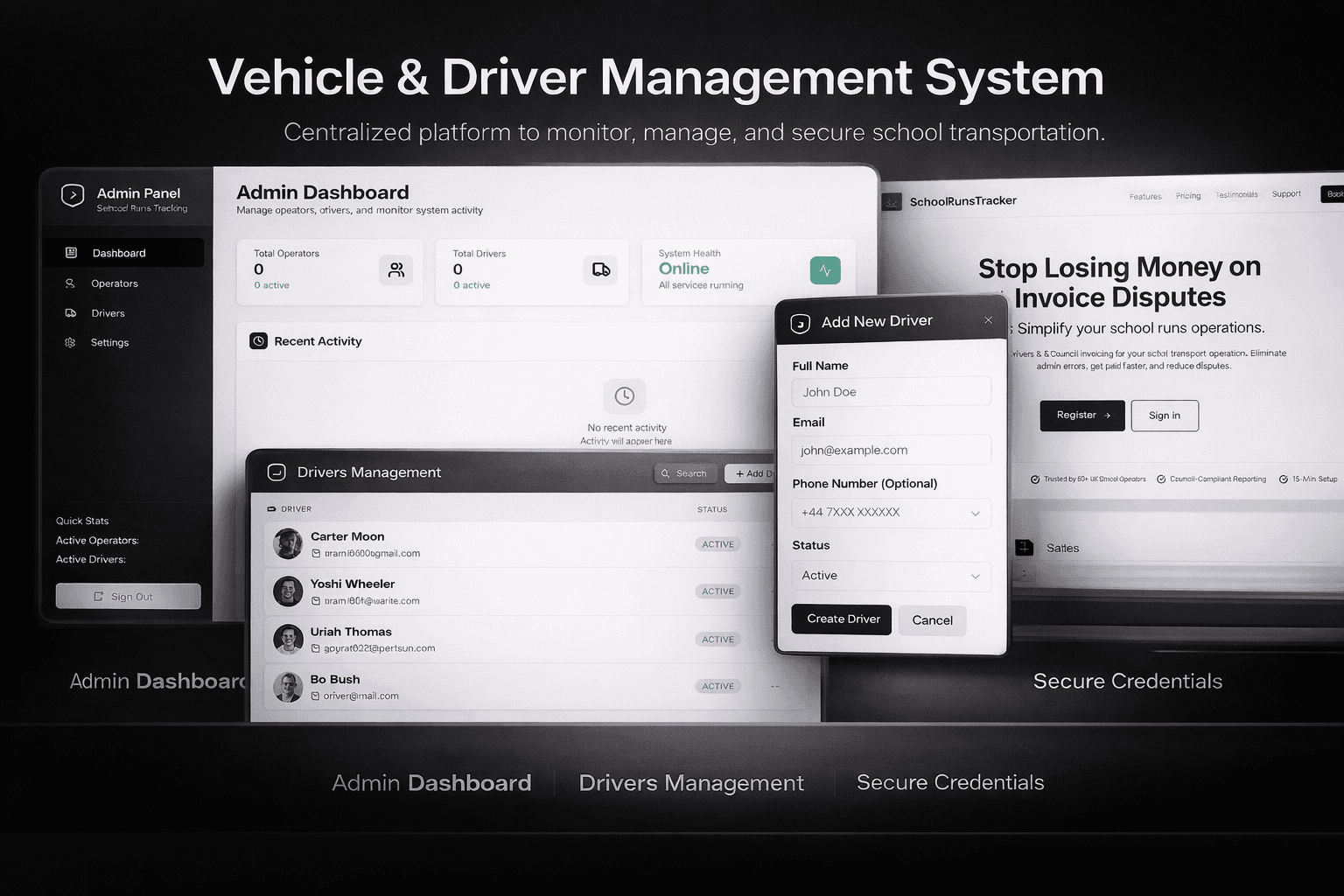
Case study
School transport ops
4.2 · 36 reviews
The challenge
Taxi and cab companies handling school runs needed more than a dispatch spreadsheet. Drivers had to log runs and earnings, operators had to manage students, routes, invoices, and payouts, and owners needed a view of the whole operation.
Security mattered as much as workflow: OTP verification, secure sessions, and role-based access so a driver never sees an operator’s books, and an operator cannot touch owner-level controls.
The solution
Step 01
Split the product by role
Designed three dashboards — Owners, Operators, and Drivers — around the same data model so each person only sees the work they are responsible for.
Step 02
Cover the full school-run loop
Drivers log runs and track earnings. Operators manage drivers, students, routes, invoices, and payouts. Admins monitor activity across the system.
Step 03
Lock the perimeter
Built on Supabase with OTP verification and secure session management so school and payment data stay behind the right account.
System design
Three React dashboards share one Supabase backend. Auth, row-level policies, and session handling sit in the middle so each role reads and writes only the tables their job requires.
Drivers attach to runs and earnings. Operators own students, routes, invoices, and driver payouts. Owners and admins see fleet-wide activity without sharing operator credentials.
OTP verification and MFA gate sign-in before any dashboard loads. Sensitive school and payout fields never render in the UI unless the signed-in role passes policy checks.
- React dashboards
- Supabase
- OTP + MFA
The website
The public-facing product is a set of role-specific web dashboards—not a marketing site. Each login lands on a tailored home: drivers on run logging, operators on routes and billing, owners on oversight.
Layouts prioritize daily tasks: large tap targets for drivers in the field, dense tables for operators reconciling invoices, and summary views for owners checking fleet health.
Session timeout, OTP re-verification on new devices, and clear sign-out keep school-run data off shared machines.
Test cases
Driver logs a completed school run
Preconditions: Driver account with assigned route; OTP verified session.
Steps
- Sign in as driver and open the dashboard.
- Start a run from the assigned route.
- Mark pickup and drop-off stops in order.
- Submit the run as completed.
Expected
Run appears in driver history with correct earnings; operator sees the run on the route timeline.
Operator creates a student route and assigns a driver
Preconditions: Operator account; at least one driver and student record exist.
Steps
- Sign in as operator.
- Create or edit a route with pickup and drop-off windows.
- Assign a driver to the route.
- Save and publish the schedule.
Expected
Driver dashboard shows the new assignment; route details match operator input.
Operator generates an invoice from logged runs
Preconditions: Completed runs exist for the billing period.
Steps
- Open invoicing as operator.
- Select the billing period and eligible runs.
- Generate the invoice and review line items.
- Confirm and mark invoice as sent.
Expected
Invoice totals match summed run data; status updates without duplicate charges.
Owner views fleet activity without operator permissions
Preconditions: Owner account; active operators and drivers in the system.
Steps
- Sign in as owner.
- Open fleet overview and filter by date.
- Attempt to open operator-only payout controls via URL or nav.
Expected
Owner sees read-only fleet metrics; operator payout actions are blocked by role policy.
Driver cannot access operator invoice data
Preconditions: Valid driver session.
Steps
- Sign in as driver.
- Navigate to operator invoice routes or API-backed invoice views.
Expected
Access denied or empty state; no invoice or payout data exposed.
OTP required on new device sign-in
Preconditions: Registered user; sign-in from a device without an active session.
Steps
- Enter credentials on the sign-in screen.
- Complete OTP verification when prompted.
- Land on the role-appropriate dashboard.
Expected
Session is created only after OTP; wrong OTP does not grant access.
Session expires after inactivity
Preconditions: Signed-in operator; idle beyond session timeout.
Steps
- Leave the dashboard idle past the configured timeout.
- Attempt any action or refresh the page.
Expected
User is signed out and redirected to sign-in; no stale data actions succeed.
Operator updates student pickup point
Preconditions: Student linked to an active route.
Steps
- Edit student record as operator.
- Change pickup location and save.
- Open the same route on the driver view.
Expected
Driver sees updated pickup details on the next run for that student.