Secure LMS Platform
A full-scale LMS for a digital-skills agency — enroll, learn live, submit work, and keep course media from leaking.
Explore case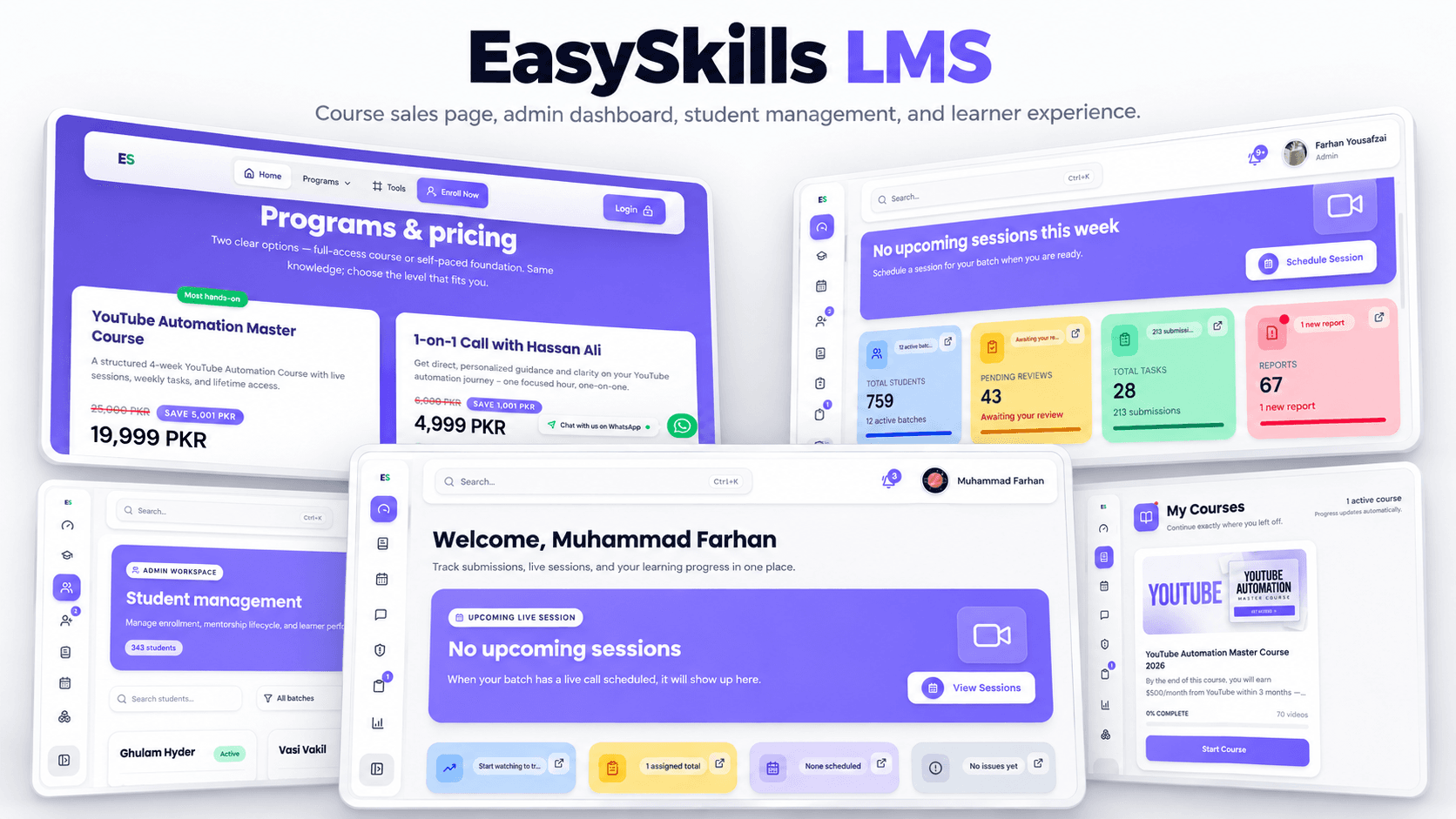
Case study
Secure e-learning LMS
4.4 · 29 reviews
The challenge
An e-learning agency needed students to enroll, attend live sessions, submit tasks, track progress, and compete on leaderboards — with an admin side for courses, videos, reports, and performance.
Course video and materials had to stay inside the product. Content protection, automated notifications, and progress tracking were as important as the lesson UI.
The solution
Step 01
Map student and admin jobs
Separated the student loop (enroll, attend, submit, progress) from the admin loop (students, courses, tasks, videos, reports) so neither dashboard was a leftover of the other.
Step 02
Protect the catalog
Implemented content protection to reduce unauthorized recording and distribution, while keeping playback usable for paying students.
Step 03
Measure what happens
Wired analytics, leaderboards, automated notifications, and progress tracking so instructors can see who is moving and who is stuck.
System design
Student progress, live sessions, and admin reports share one data model. Content protection sits on media routes; analytics sit on the same events the UI already records.
Next.js + React — Student and admin UI
API layer — Enrollments and progress
MongoDB — Users, courses, tasks
Protection + analytics — Media and reports
- Next.js + React
- API layer
- MongoDB
- Protection + analytics
The website
Student learning and protected course media
Enrollment, live sessions, tasks, progress, and leaderboards run in one LMS instead of a stack of plugins.
Content protection and access control reduce unpaid redistribution of course video and files.
Admins get reports and analytics; students get progress and notifications without extra tools.
Test cases
Map student and admin jobs
Steps
- Separated the student loop (enroll, attend, submit, progress) from the admin loop (students, courses, tasks, videos, reports) so neither dashboard was a leftover of the other.
Expected
Behaviour matches the approach described above in production.
Protect the catalog
Steps
- Implemented content protection to reduce unauthorized recording and distribution, while keeping playback usable for paying students.
Expected
Behaviour matches the approach described above in production.
Measure what happens
Steps
- Wired analytics, leaderboards, automated notifications, and progress tracking so instructors can see who is moving and who is stuck.
Expected
Behaviour matches the approach described above in production.